

Copilot Cat
Have you created an application so feature-rich that users need to consult tutorials or sift through documentation to grasp its functionalities. Consequently, the steep learning curve is deterring users from utilizing it. This is where a good UX comes into play. With the advent of Large language models (LLMs) or ChatGPT, the most simplified UX that everyone is moving forward to is a conversational bot or a copilot.
A copilot or a conversational AI assistant tool can benefit the users through
- Answering — Responding to any user questions about the application.
- Assisting — Helps complete task efficiently without going down the rabbit hole of learning the software jargon
- Automation — Can establish and automate workflows. Repetitive tasks or a sequence of tasks could be packaged as a flow to the user which the bot could trigger.
What makes a Copilot different from general OpenAI ChatGPTs or LLMs?
Apart from the general answering capabilities, what makes it different is the ability of the chatbot to interact and trigger events specific to the application. Two central modes of interaction between the copilot and the application are through its specific knowledge bases and its event APIs.
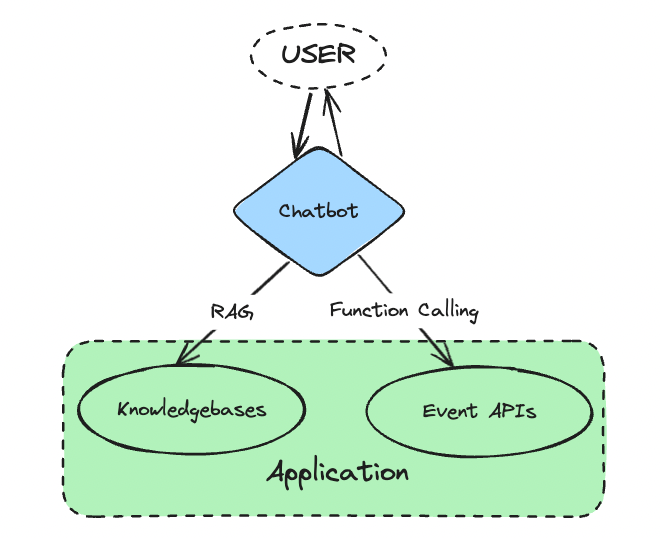
Interaction modes of a chatbot with the application
Knowledge-base
The complete application-related information that should be accessible by the user forms its knowledge base. Since this information could be too much to process or even search for relevant information for the end-user, we can make use of an assistant. The chat assistant could process this information, index, and understand it so that it could answer specific user questions.
RAG— This is achieved viaRetrieval Augmented Generation (RAG). RAG is a technique where based on the user query, a relevant chunk of the knowledge base that contains the user’s answer is estimated and inserted into the LLM prompt for fetching the answer. Here the knowledge base is broken down into chunks of an appropriate predetermined size and each chunk is stored and indexed in a vector database for efficient searching. When retrieving the relevant chunk, a semantic search between the user query and the database vectors is carried out. To make it furthermore robust, we instruct the LLM to detect if the answer is not present in the retrieved chunk. In that case, the next best semantically similar chunk is picked and processed.
Event APIs
All the interactable components and the functional events that the application offers are triggered by calling their respective event APIs. For example, for an emailing software like Outlook, to send an email, the respective API let’s say, outlook.office.com/send_email?=message_body=Heythere&to=mayank is hit after passing the appropriate payload which here would be the sender’s email and the message body. Based on the user’s message, the copilot would need to identify the correct API that has to be triggered and also extract the appropriate payload from the user to trigger the event.
Function Calling— Current LLMs are able to achieve this viaFunction Calling. There is a synonymity between a function and an API in the sense that they have a distinct name and a defined payload/parameter and hence these terms can be used interchangeably with respect to an LLM function call. The list of functions and their parameters are defined in the prompt and based on the user message, the LLM makes the decision to choose a function and populate its parameter. If any information is insufficient, then LLM can make a decision to ask the user for more information. This level of task orchestration via LLM alone is possible only for simple tasks and fewer functions. As the tasks become more complex and the number of functions increases, we require an intermediary orchestrator or framework that could either break down the tasks into smaller atomic steps or limit the functions via semantic similarity.
Enabling these two modes of interaction between an LLM and the application is sufficient to encompass the complete software’s capabilities and package it into a Chat Assistant Copilot. However, the LLM’s answering capabilities, the LLM’s function calling ability, and the RAG techniques, all have their limitations and might not work in the best manner for all the different use cases. To efficiently incorporate any new application use case, one might need to experiment with the choices of the LLMs, the function calling framework and the RAG techniques to ascertain the combination that works best. Apart from this, the permissions to the event APIs and the knowledge bases might also vary from user to user and would require an intermediary to handle this. Hence comes the need for a robust copilot infrastructure.
Copilot System Design
Photo by Amélie Mourichon on Unsplash
The design of a copilot system should be such that it could easily integrate any new use case and would require minimal coding effort and maximal code reuse. Any new use case addition should be thought of as a plugin that packages a set of APIs and knowledge bases that could be defined in a simple YAML/JSON format. The deployment config should define the accesses for the plugin as well as the APIs involved in those plugins.
Apart from the user’s perspective of handling the different application use cases through RAG and function calling, certain infrastructural features that a copilot design will need are as follows:
- Evaluation — Measure to evaluate the performance of the choices of the prompt, the model, and the retrieval techniques
- Monitoring — In production monitoring and alerting to track the performance and the failures as well as the cost and latency. Aggregating and categorizing input data that might be helpful for fine-tuning.
- Feedback — User feedback that can be leveraged for efficient retraining.
- Guardrails — Pre and post-guardrails to prevent any data leaks and unwanted responses
- Prompt Formatting and Compression— For cost reduction as well as performance improvement.
There are several moving parts involved in the functioning of a copilot and hence it might need sufficient research as well as some measure of flexibility when designing a certain component.
Flexible Components
Based on the use case, there will be a tradeoff between accuracy and latency. We will need flexible components that can be easily switched to hit the sweet spot. These components are central in the processing of the use case and could be maintained in a common store for easy reuse. They can be listed as follows:
- LLM Model for answering — The large language model is central in answering all the queries in natural language. It can be the standard OpenAI GPT models or an open source alternative like LLAMA or any task fine-tuned LLM.
- Function calling model — Responsible for selecting the correct function to call for a given task. This can be the same LLM used for answering or an LLM finetuned for function calling like Gorilla or ToolLLM. Instead of LLM, one can also opt for simple semantic search algorithms for simple tasks.
- RAG technique — Responsible for retrieving the correct part of the knowledge base and feeding it to the LLM for answering. There are several RAG techniques that can be used for different tasks and use cases.
- Prompt format — For the same instruction and task, changing the prompt format could hugely vary the performance. Different prompt format works for different LLMs and accordingly, the one that works best has to be chosen. We could also maintain a prompt template store for generic tasks that could help in its reuse thus maintaining consistency.
- Planning Framework — As the tasks become more complex and require a cascade of multiple functions, an appropriate planning framework (ReAct, ReWOO, LLMCompiler) is required which can break down the use case into smaller executable atomic tasks and decide on a plan to execute them in some order.
There should be a common defined contract for the different supported models, techniques, and prompts and there should be a defined store for each of them, allowing the developer to add the request and response adapters to unify the way we interact with them.
Rigid Components
Parts of the copilot that would work in a central manner and might not change with the use cases can be listed as follows:
- SDK — These are frameworks that provide an abstraction to the LLM function calls as well as additional features like chaining and RAG. Several inbuilt functions like agent creation and planners in SDKs like LangChain/Semantic Kernel can help save a lot of implementation and complex code.
- Workflow Design — Workflows can be defined as a guided sequence of function calls or tasks to be executed to fulfill certain user journeys.
- Plugin Management— A system or a database that manages plugin access at different pages as well as to different users.
There are several choices for each of them and thorough research needs to be done for each of them before implementation for achieving scalability and to avoid any limitations in the future.
Function Design
The complete set of use cases can be resolved into a function. There can be two types of functions, dependent and independent functions. Dependent functions are ones that depend on the execution of another function. Likewise, we can understand independent functions. A generation task that requires some knowledge-base retrieval will always be carried out by a combination of two functions, one independent function that retrieves the relevant knowledge chunk and one dependent function that depends on the output of the knowledge retrieval function and uses the retrieved knowledge chunk to generate the results.
Ultimately, these are the fields that will be used to define a function:
- **name :**Name of the function that should have a corresponding functional code that gets triggered
- description : Description of the function that assists the function-calling model in selecting it when required
- schema : A defined set of input parameters required by the function along with its definitions and allowed set of values (some of which can be defined dynamically by its dependent functions)
- dependencies : A set of function names connected by logical operators that define its dependencies meticulously
- model (optional) : only for dependent function (as only in that case will the control be foregone from the central bot)
Corresponding to the name and the parameters as defined in the schema, there will be defined code for each function present in the system that gets executed and whose response is either passed to the dependent function or to the end user.
Plugin Design
A plugin can be defined as a set of functions that solve tasks in a common domain. A plugin will have two parts.
Description — A simple structured JSON/YAML file containing a plugin description and its corresponding function descriptions:
Plugin Description: A plugin can be defined by the following keys.
- name
- description
- model (optional)
- system prompt (optional)
- function_calling_model (optional)
- planning_framework (optional)
Function Descriptions: A collection of function descriptions of all the functions that it supports.
Function Executables — A single executable file containing a class with the same name as the plugin name and executable functions with the names and parameters as defined in the function descriptions.
Plugin Example YAML
Here I have described a simple plugin description YAML file for the task of Dashboard generation.
name: Dashboard Visualizer
description: A plugin for displaying visual dashboards to user as per query
model: gpt4-32k
system_prompt: You are an assistant for a Social Media dashboard. We are
receiving a stream of data from social platforms and you need to analyse
the data to offer insights to users.
function_calling_model: Gorilla
planning_framework: LLMCompilername: get_dashboard
description: fetch the dashboard data points for the given social platform for the respective duration
schema: <Payload Schema for hitting the endpoint>
dependencies: get_chart AND get_filters
user_out: true
name: get_chart
description: Initializes chart and chart fields for a dashboard
schema: <Payload Schema for hitting the endpoint>
dependencies: get_report
user_out: false
name: get_filters
description: Initializes filters for a dashboard
schema: <Payload Schema for hitting the endpoint>
dependencies: get_report
user_out: false
name: get_report
description: Gets the report name based on the user query
schema: <Payload Schema for hitting the endpoint>Flow Design
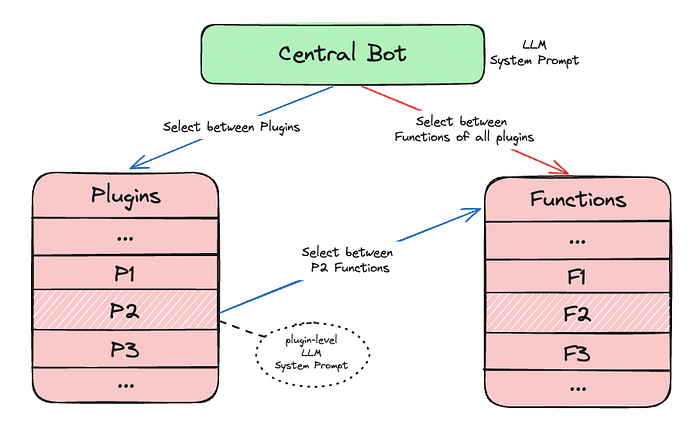
Two choices of control flow
For flow design, we have two choices.
- Centralized Bot — A single central bot responsible for orchestrating function calls across all the plugins.
- Plugin Bot — Separate bot for plugins that are passed control from the central bot and are responsible for function calling within its set of functions.
Enhancements
Apart from the basic functionality of the copilot, some enhancements that could further extend its usability can be as follows:
Cross-Plugin Interaction— Allowing the LLM access to the APIs from different plugins could let it solve certain tasks that were otherwise not possible or even discover solutions on its own.Suggestion DAG — After completion of a user task, the copilot could offer suggestions to execute some follow-up tasks based on pre-fed data or general recorded user behavior. A task DAG could be created and stored. After completion of any task, the DAG is referred and the follow-up task is suggested.
Loading comments...